Many companies are cutting back and delaying new projects after the recent election. As a new solution provider, how do you create a win-win situation for customers who might worry about:
quality of the solution
satisfaction with the result
cost
How can you add value for the customer by reducing risk or cost?
I propose 4 types of customers:
Regular customer: straight work for hire.
Reference customer: provides a private reference for my work to a potential customer.
Sponsor customer: the company is publically promoted as a user of the product.
Partner customer: actively promotes the product within their market.
Regular customer
The customer receives a proposal for their project. Engages in discussions regarding the scope of work, pricing, and other details. Once the contract concludes, there is no continued relationship with the client.
On the Roundup Issue Tracker mailing list a user asked for a mechanism to create a reference for the current issue and copy it to the clipboard.
The request was for the reference to look like:
issue2345: title of issue
In Roundup, object designators like issue2345 are automatically hyperlinked to the corresponding object.
The code I recommended used a button to trigger this operation. It also used the clipboard API. When clicking on the button (or hitting space or return while focused on the button) the reference format above will be copied to the clipboard. Triggering the clipboard API must be done by a user interaction. For example: activating a button. If the browser does not support the clipboard API, a simple alert() is shown.
In addition to copying to the clipboard, the user gets feedback when the text of the button changes to “Reference copied”. Then it resets to the original message after 2 seconds. Since clicking the button multiple times is idempotent, there is no sense in disabling or debouncing the button.
Shakespeare once said “A rose by any other name would smell as sweet”. I wonder if something similar can be said for software releases.
I am planning a new release of the opensource Roundup Issue Tracker. Historically, release schedules were on an as needed basis. Before 2006 (when version 1.0.0 was released) there were multiple years with more than 10 releases (including alpha/beta and other pre releases).
Year
Releases
Year
Releases
2022
2
2009
5
2021
2
2008
5
2020
2
2007
3
2019
2
2006
13
2018
1
2005
8
2016
1
2004
19
2013
1
2003
16
2012
2
2002
12
2011
3
2001
7
2010
5
But there were no releases from 2013 until 2016. Also, there was a gap in 2017. There was significant development done during those years without releases. But only those willing to run code from the repository were able to benefit. In 2018 I took over as release manager and chose to start doing yearly releases.
Why Release
With opensource projects, there are many reasons to release:
One of the things I have to do when developing a new tracker for the Roundup Issue Tracker is test on mobile browsers. When I run into issues, I used to hook up a remote debugger. This usually requires finding a USB cable as wifi is less reliable.
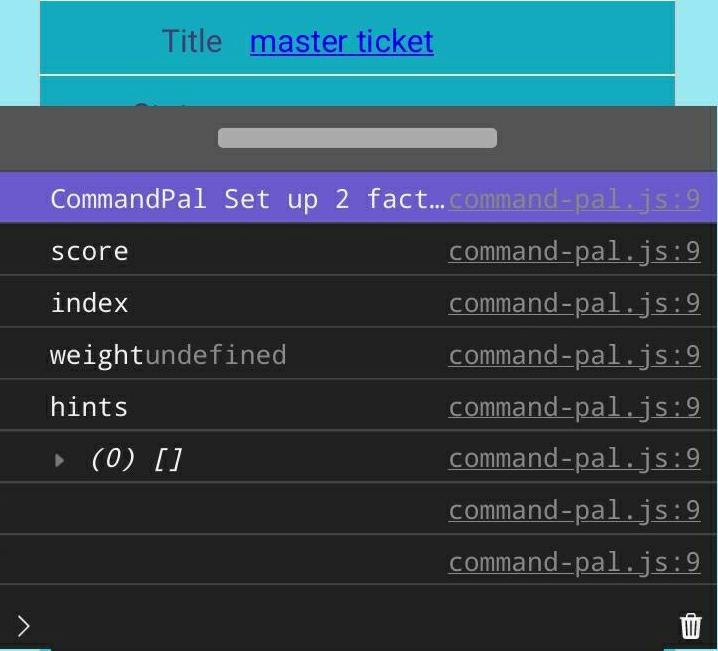
I really wish that mobile browsers had a native console that I could use to see console.log output and javascript errors. While not native, MobileConsole by hnldesign provides quite a bit of power by including one script and one style tag in my HTML page. At 45k uncompressed (17k gzipped) it's sized between the smallest and largest mobile consoles I found.
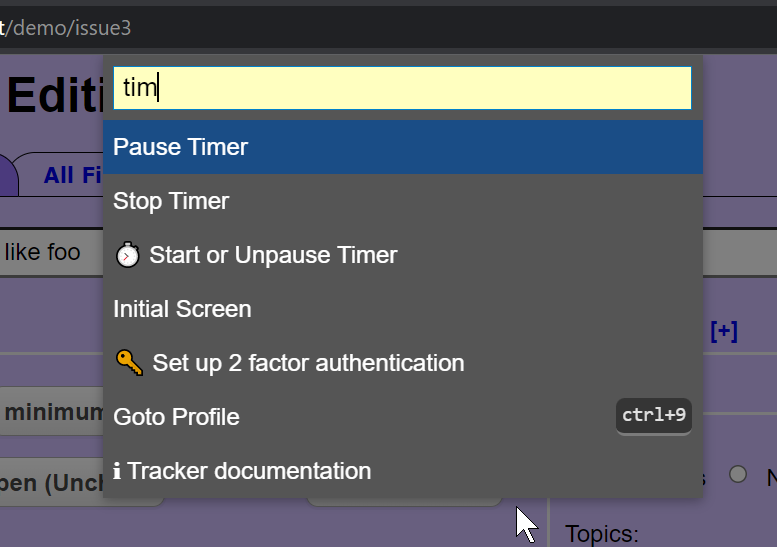
I am a developer for the open source Roundup Issue Tracker. It has many use cases. One is to develop issue trackers like GitHub Issues, Bugzilla, or Request Tracker. I also develop a custom issue tracker for a help desk environment. This article describes the steps in adding a task-timing feature for that tracker.
A user requested a task timer. The workflow:
open an issue page,
start a timer,
start the task associated with the issue,
use the issue page to document the work.
When done, the user would:
stop the timer,
finish documentation, attach files, and make other changes to the issue,
submit the time and other changes.
There are a few decisions to make:
timer functions
is start/stop enough?
is pause/restart needed?
does the user need to change/set/edit the timer?
do we need to track seconds, minutes, and hours? Since the customer is billed for the time, recording seconds seems excessive. Is there a scenario where the timer would need to record seconds?
timer controls
do we use a button/buttons? Does checking a checkbox activate the timer?
what does the UI look like for each timer function?
Are the controls in the issue page?
Are the controls in a floating popup? Does the popup need to be movable/collapsible
so it doesn't block access to the underlying issue?
notification feedback
how is the user notified that the timer is running/paused/stopped?
how does the user see the elapsed time?
future planning
how to add controls without cluttering an already complex interface
what impact will this have on adding future feature requests in the same context
does this guide us in implementing future workflows
Welcome to the first article on the ongoing development of the Roundup Issue Tracker. Before we get started, a little about me.
I have a B.S. in Physics which included some advanced computer science courses. But, my career ended up in system administration. I have taught and published a few peer-reviewed papers at conferences over the years. Trying to reduce toil and improve operations, lead to my interest in ticketing systems. Tools from LEAN and Six Sigma have proven valuable in analyzing ticketing and real-time logging data.
Issues Need Tracking
In 2002, I ran a lab that installed a system monitoring solution on Sun computers. We needed to track requests that came to the lab. I evaluated ticketing systems across a few dimensions. The Roundup Issue Tracker scored the highest.
Five minutes after downloading the software, I had a classic tracker running in demo mode. After entering a few tickets and adding a few keywords (tags), my co-worker and I decided it could work. It was flexible and looked like we could extend it to support our future growth. Little did I know that this was the start of a 20+ year relationship.

 I am a developer for the open source