My Corner Blog

Reader

Read the latest posts from My Corner Blog.

from Roundup Issue Tracker

Many companies are cutting back and delaying new projects after the recent election. As a new solution provider, how do you create a win-win situation for customers who might worry about:

  • quality of the solution
  • satisfaction with the result
  • cost

How can you add value for the customer by reducing risk or cost?

I propose 4 types of customers:

  1. Regular customer: straight work for hire.
  2. Reference customer: provides a private reference for my work to a potential customer.
  3. Sponsor customer: the company is publically promoted as a user of the product.
  4. Partner customer: actively promotes the product within their market.

Regular customer

The customer receives a proposal for their project. Engages in discussions regarding the scope of work, pricing, and other details. Once the contract concludes, there is no continued relationship with the client.

Reference Customer

A reference customer starts as a regular customer. As part of the contract, they agree to talk with potential clients to discuss:

  • the project scope,
  • the benefits of the solution,
  • and the overall business impact of the work performed.

Contracts are protected by a non-disclosure agreement to safeguard the confidentiality of references. This allows prospective clients to better understand the value proposition. But it prohibits them from sharing any proposal-related information outside their organization.

In exchange for serving as a reference, these customers receive discounted rates on their contracts.

A sponsor customer is a reference customer who has consented to publicly associate their company name with the solution/product. This association includes prominent visibility on websites, emails, and various marketing materials.

Sponsor customers receive a greater discount on their contracts compared to reference customers. They may enjoy other benefits, such as enhanced support agreements.

Partner Customer

A partner customer can be in any of the other customer categories. Unlike the other customers, who take a passive approach to supporting the product, these customers actively advocate for the product.

They share their positive experiences with others in the same industry. This strategy is particularly effective when the product offered is not a primary focus or distinguishing factor for the customer's business.

Rather than receiving discounts on contracts, these customers benefit from additional revenue when a client they refer decides to purchase the solution.

Conclusion

Offering customers an ongoing role in the success of your business can reduce their concerns about your solution. This win-win approach to negotiating contracts can also reach new clients and help answer the concerns of new clients.

What are your thoughts about these customer categories? What tools/techniques do you use to help customers get to yes?

(A good reference on negotiating is https://www.amazon.com/Getting-Yes-Negotiating-Agreement-Without/dp/0143118757.)

#opensource, #Business, #DevTo

 
Read more...

from Roundup Issue Tracker

On the Roundup Issue Tracker mailing list a user asked for a mechanism to create a reference for the current issue and copy it to the clipboard.

The request was for the reference to look like:

  issue2345: title of issue

In Roundup, object designators like issue2345 are automatically hyperlinked to the corresponding object.

The code I recommended used a button to trigger this operation. It also used the clipboard API. When clicking on the button (or hitting space or return while focused on the button) the reference format above will be copied to the clipboard. Triggering the clipboard API must be done by a user interaction. For example: activating a button. If the browser does not support the clipboard API, a simple alert() is shown.

In addition to copying to the clipboard, the user gets feedback when the text of the button changes to “Reference copied”. Then it resets to the original message after 2 seconds. Since clicking the button multiple times is idempotent, there is no sense in disabling or debouncing the button. Note, this is unlikely to be a11y compliant as I don't think the change of button text is announced. If anybody has some ideas on how to make this more compliant, leave them in the comments. Maybe using aria-live="polite" or "assertive" on the button element would do the trick?

Here is the code I suggested:

<button id="copyreference" type="button"
            tal:condition="context/is_edit_ok">
   Copy Reference
</button>

<script tal:attributes="nonce request/client/client_nonce">
  (function () {
    "use strict";

    let crb = document.querySelector("#copyreference");
    if ( ! crb ) return
    crb.addEventListener("click", async (e) => {
        e.preventDefault()
        if ( ! navigator.clipboard ) {
            alert("Clipboard is not available")
            return
        }

        let issueDesignator = new URL(document.URL)
            .pathname
            .split("/")
            .pop()
        let issueTitleText = document.querySelector("#title").value;

        await navigator.clipboard.writeText(`${issueDesignator}: ${issueTitleText}`)

        let originalCrbInnerText = crb.innerText
        crb.innerText = "Reference copied"
        setTimeout(() => {
            crb.innerText = originalCrbInnerText}, 2000)
        }
    );
  })();

The flexibility of Roundup allows the administrator to rewrite all of the HTML used in the web interface. As a result, I based my guess of CSS selectors on the HTML generated by the classic issue.item.html TAL template.

The button could be placed anywhere on the page and the script (including the nonce required by the CSP) would be placed anywhere after the button. Probably at the end of the page so it doesn't block rendering.

The classic structure of the issue display page for users with editing capability included an input with the id title. This is retrieved using the id and included in the string written to the clipboard.

A user without editing capability for the issue (or without editing capability for the title attribute of an issue) does not have an input with id="title". In these cases, the admin would have to modify the issue.item.html template to add an id of title to the enclosing element. Then the code above would be modified to replace:

let issueTitleText = document.querySelector("#title").value;

with:

 let issueTitle = document.querySelector("input#title");
   if ( ! issueTitle ) {
     issueTitle = document.querySelector("#title");
     issueTitleText = issueTitle.innerText
   } else {
     issueTitleText = issueTitle.value
   }

In my original example, the button element is generated only if the user can edit the issue. Removing the tal:condition attribute would always display the button.

There is nothing with an id or CSS selector that contains the object designator. I use the final element of the path of the URL to get the designator.

I chose to use the IIFE code structure. This allows me to use the early return pattern if the button is not found. If anybody knows how to do the equivalent of an early return without an IIFE or other function in a script tag, leave your trick in the comments.

If you use the Roundup Issue Tracker and have your own enhancements, feel free to mention them in the comments. #WebDev, #opensource #RoundupTracker #DevTo

 
Read more...

from Roundup Issue Tracker

Shakespeare once said “A rose by any other name would smell as sweet”. I wonder if something similar can be said for software releases.

I am planning a new release of the opensource Roundup Issue Tracker. Historically, release schedules were on an as needed basis. Before 2006 (when version 1.0.0 was released) there were multiple years with more than 10 releases (including alpha/beta and other pre releases).

Year Releases Year Releases
2022 2 2009 5
2021 2 2008 5
2020 2 2007 3
2019 2 2006 13
2018 1 2005 8
2016 1 2004 19
2013 1 2003 16
2012 2 2002 12
2011 3 2001 7
2010 5

But there were no releases from 2013 until 2016. Also, there was a gap in 2017. There was significant development done during those years without releases. But only those willing to run code from the repository were able to benefit. In 2018 I took over as release manager and chose to start doing yearly releases.

Why Release

With opensource projects, there are many reasons to release: * get features/bug fixes to users * thank contributors * increase project visibility * establish expectations * provide deadlines

As I mentioned above, producing a release makes the work of contributors (developers, documentation writers, people reporting issues) isn't generally available. Frequent releases align with my preference to reduce WIP (work in progress). Thanking the contributors by releasing their work helps drive enthusiasm and engagement.

Announcements on multiple platforms accompany each release. When I see another issue tracking/bug reporting program release announcement, I experience FOMO over the marketing provided by their announcement.

A regular release cadence helps users to schedule time for testing or upgrading the software. Also, regularly scheduled releases encourage developers to finish their work and get it into a release. This deadline also drives me to go through all the steps to generate a beta and final release. This year (2023) will be my 6th yearly release.

When to Release

Although I do believe that reducing WIP is important, Roundup is not provided as a SAS (software as a service). It is deployed on-prem and meant to be customized. Some changes to Roundup require changes to a customized installation as part of the upgrade. For example:

  • upgrade from Python 2 to Python 3 can require rewriting a tracker's business logic
  • support for newer databases versions can require table alteration (sometimes manual, sometimes programmatic using the roundup-admin migrate command)
  • security improvements and CSRF protection require changes to customized HTML templates.

I mentioned my FOMO when seeing other products release multiple times a year. I often see releases with 5 or so changes. Often these changes fix cosmetic issues or broken fields in the web interface.

With Roundup, many users have redesigned/replaced part of the interface. A release only supplies changes to the reference interfaces. The Roundup administrator needs to merge the reference changes into their production interface. In Roundup, changes can be implemented in production without requiring a release. This separation of concerns between the Roundup core and a customizable tracker makes Roundup more flexible. But, increases the work required during an upgrade.

Because of how customizable Roundup is, I try to balance between WIP and the churn caused by frequent releases. Yearly seems to be a sweet spot. There are occasions when a new core feature needs a change/bug fix. In that case the user has a choice to wait for a new release or use the most recent commit to the development repository.

If Roundup was a SAS with more limited customizability, we could do canary deploys directly from the repository. This would positively affect:

  • getting features/bug fixes to users
  • thank contributors

but would also reduce the utility of Roundup. Setting up a Getting Things Done tracker for his/her family would find it very difficult in a SAS based model. Also, the tempo of releases in a SAS based model may not align with the user's needs for a stable platform.

If Shakespeare were a software writer would he have penned “Would software by another release schedule smell as sweet?”. Leave your thoughts in the comments.

(Cover Image by Glen Carrie)

#webdev, #discuss, #opensource, #development

 
Read more...

from Roundup Issue Tracker

I tried a little experiment to make a popup using a details element. The goal was to see if I could make a clickable popup without using JavaScript. It should be accessible for both sighted users and users using a screen reader like NVDA.

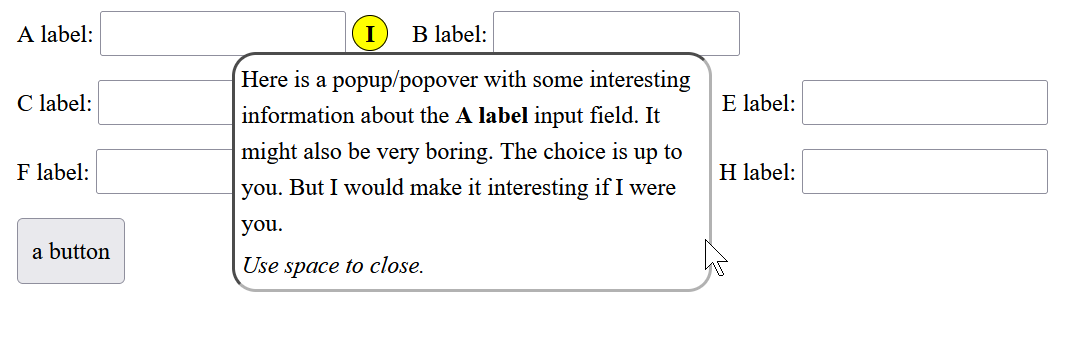
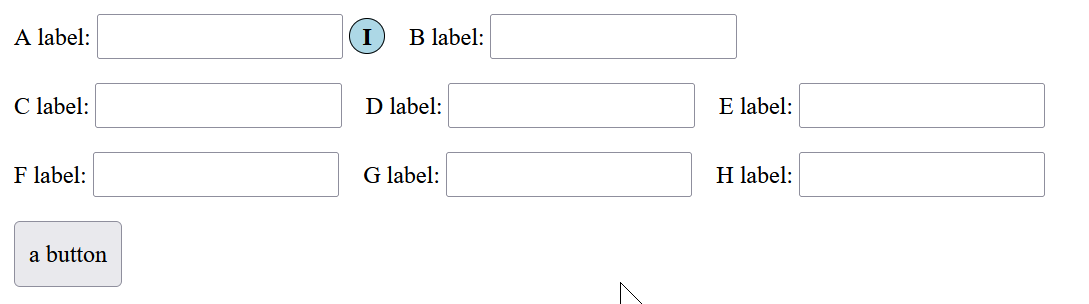
The HTML test case is a form with an info icon (the letter I in a circular blue field) after an input element. It is straightforward semantic HTML. The details element has a summary as its first element and a div enclosing paragraphs as the details' body. The summary element is the letter I styled using CSS to put the I (for info) on a circular lightblue field. The form looks like:

Image showing detail popup closed. The circular icon with an I in it used to open the popup has a light blue background color indicating it is closed. The rest of the screen displays labels, input fields, and one button at the bottom as you would see in a typical form.

The HTML is:

  <body>
    <form>
      <div>
	<span><label for="a">A label:</label> <input id="a">
	  <details class="inline" aria-live="polite">
	    <summary aria-label="Activate for info on A label.">I<!--<img src="logo.png">--></summary>
	    <div>
	      <p>
		Here is a popup/popover with some interesting information
		about the <b>A label</b> input field. It might also be very
		boring. The choice is up to you. But I would make it
		interesting if I were you.
	      </p>
	      <p><em>Use space to close.</em></p>
	    </div>
	  </details>
	</span>
	<span><label for="b">B label:</label> <input id="b">
      </div>
      <div>
      	<span><label for="c">C label:</label> <input id="c"></span>
...
  </form>
</body>

There is a small sprinkling of ARIA. The summary field's aria-label announces what happens when you open the details element. Originally I added aria-live="polite" on the div after the summary. But the detailed text was not announced when the details element opened. Moving aria-live to the details element, announced the text automatically when opened.

The summary icon trigger is opened by:

  • clicking on the icon with the mouse,
  • focusing on the icon (using tab) and
    • hitting space or
    • hitting return

Unlike other popups, this is triggered by a focusing user action rather than hover so it works on mobile as well.

The CSS was also rather straightforward. Changing the detail element's display to inline-block (default block) keeps it on the same line as the input. Changing the summary item's display to inline-block (default list-item) removes the open/close arrow associated with the details summary.

The icon was formed by using border-radius and background-color. To get things to align, I set the custom property --icon-size to the line height of the page. This property then gets used to square up (circle up 8-)) the shape of the summary text icon. You can use an image as well if you want. The background of the icon changes when opened, and can be seen through transparent parts of an image.

The details element (with the inline class) has its position set to relative. This makes positioning the div containing the detailed text easier. The div itself uses position: absolute. With these settings, the attributes left, top, right, and bottom can be used to shift the div relative to its default location.

This is the complete CSS:

/* styles for details popup */
:root { --icon-size: calc(1.5em); /* line height */ }
details.inline {
  display: inline-block;
  position: relative; /* anchor popup position */
}
details.inline summary {
  background-color: lightblue;
  border: 1px black solid;
  border-radius: 50%;
  cursor: default;
  display: inline-block;  /* remove marker */
  font-weight: bold;
  height: var(--icon-size); /* make icon round */
  text-align: center;
  width:var(--icon-size); /* make icon round */
}
details.inline summary img {
  /* if you want to use an image */
  height: var(--icon-size);
  width: var(--icon-size);
}
details.inline > div > * {
  margin-block: 0.25em;
  padding-inline: 0.25em;
}
details.inline[open] summary { background-color: yellow; }
details.inline[open] > div {
  background-color: white;
  border: 2px inset black;
  border-radius: 1em;
  left: -10ch; /* shift box to left */
  /* Move the popup box after the icon with
     a 5px gap */
  /* left: calc(var(--icon-size) + 5px); */
  position: absolute;
  /* To align first line of popup with the baseline of the icon:
   * shift up by 1/3 of the line height (--icon-size * -0.3333)
   * then shift down by the margin-block on the div (+ 0.25em).
   * This turns out to be 0.25em. */
  /*top: calc((var(--icon-size) * -0.333) + 0.25em);*/
  width: 40ch;
}

The open popup looks like this: Image showing detail popup open. The circular icon with an I in it used to open/close the popup has a yellow background color indicating it is open. The popup sits on top of other text on the page. It is shifted to the left under the opening icon.

Prettier styling is an exercise for the reader 8-).

It can be enhanced with JavaScript to:

  • close with a keypress (using the escape key for example)
  • close with a mouse click outside of the popup

Even without JavaScript, it is usable in Firefox and Chrome (which includes browsers like Edge, Brave, Vivaldi...). The details element should be accessible out of the box since it is a native HTML control. Although I only tested with NVDA and Windows Narrator, I expect it will work with other screen readers as well. (Note that Narrator would sometimes refuse to read the popup when opened. I have not discovered what causes it to refuse to read the popup on open. Moving the cursor with the right arrow key causes it to read the popup, and pressing the space key still closes the popup so....)

This seems to be a successful experiment. Custom variables, details element, and calc are all well supported. This technique should work on the majority of browsers out there today.

This technique will probably make it into some of the trackers I design for the Roundup Issue Tracker.

#HTML #DevDotTo #WebDev #a11y

 
Read more...

from Roundup Issue Tracker

One of the things I have to do when developing a new tracker for the Roundup Issue Tracker is test on mobile browsers. When I run into issues, I used to hook up a remote debugger. This usually requires finding a USB cable as wifi is less reliable.

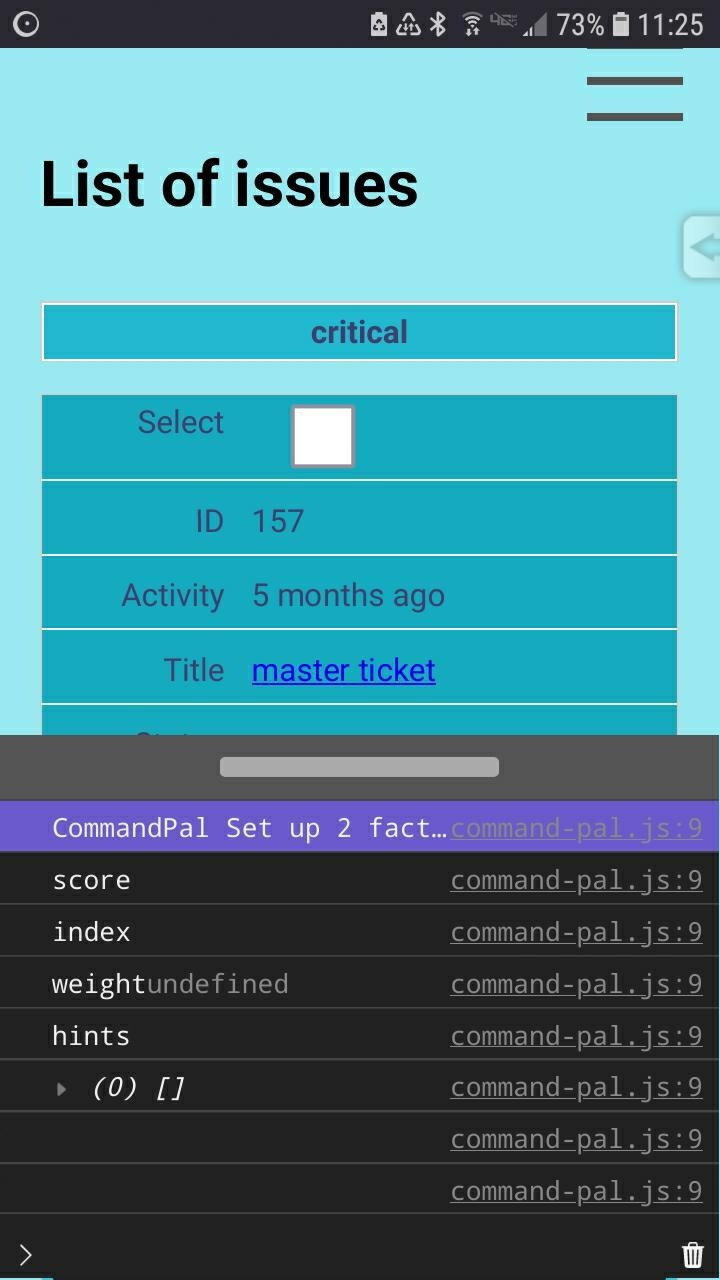
I really wish that mobile browsers had a native console that I could use to see console.log output and javascript errors. While not native, MobileConsole by hnldesign provides quite a bit of power by including one script and one style tag in my HTML page. At 45k uncompressed (17k gzipped) it's sized between the smallest and largest mobile consoles I found. It can be seen at the bottom of the web page:

Phone screenshot showing the MobileConsole displayed on the bottom half of the screen. The top half displays a web page. There is a movable divider between the two. The console is showing log messages from the page along with the line number where they were logged

It supports the usual console output functions (error, ... debug). Plus it supports console.time/timeEnd and console.trace along with the group family. It also displays objects collapsed and allows you to toggle them open. The console can be resized allowing you to reduce the screen real-estate used on a mobile device.

It has some areas for improvement: * it only opens objects one level deep. So an array in an object is displayed but you can't expand the array further to get access to its elements. * grouping is not nested or collapsible. But this is noted as an area for improvement.

If you do a lot of logging, you might want to download the library, open your editor, and apply a change that reduces redraws triggered by console output.

One thing to note is that running commands in the console will not work if you are using a Content Security Policy (CSP). Any CSP that does not allow 'unsafe-eval' will prevent console commands from running. But at least you will see the error in the console 8-).

There are other mobile consoles as well:

  • mobileConsole is the smallest at 5k, but appears to only support console.log. Documentation is sparse and there is no demo.
  • B1naryStudio js-mobile-console – is 6k in size. It has methods to show/hide, enable auto-opening on error, and create command aliases. However, in its demo, I had issues with it displaying document.querySelect('body'). All it showed was an empty object {}.
  • Eruda is a console with a size of 130k gzipped. However, with that size, you get an element browser, network monitor, and other tools you know from your desktop browser's DevTools. It also has a plugin ecosystem. It properly handles console.group as a toggle. Also you can submit multi-line scripts. I think the only thing Eruda is missing is a debugger 8-).

Using hnldesign's MobileBrowser I was able to figure out why my javascript was crashing. If your hardware can handle it though, Eruda has many more features to make debugging on mobile device easier. Now the only time I need to find a USB cable is when I have to debug using breakpoints.

#WebDev #DevDotTo #OpenSource, #javascript

 
Read more...